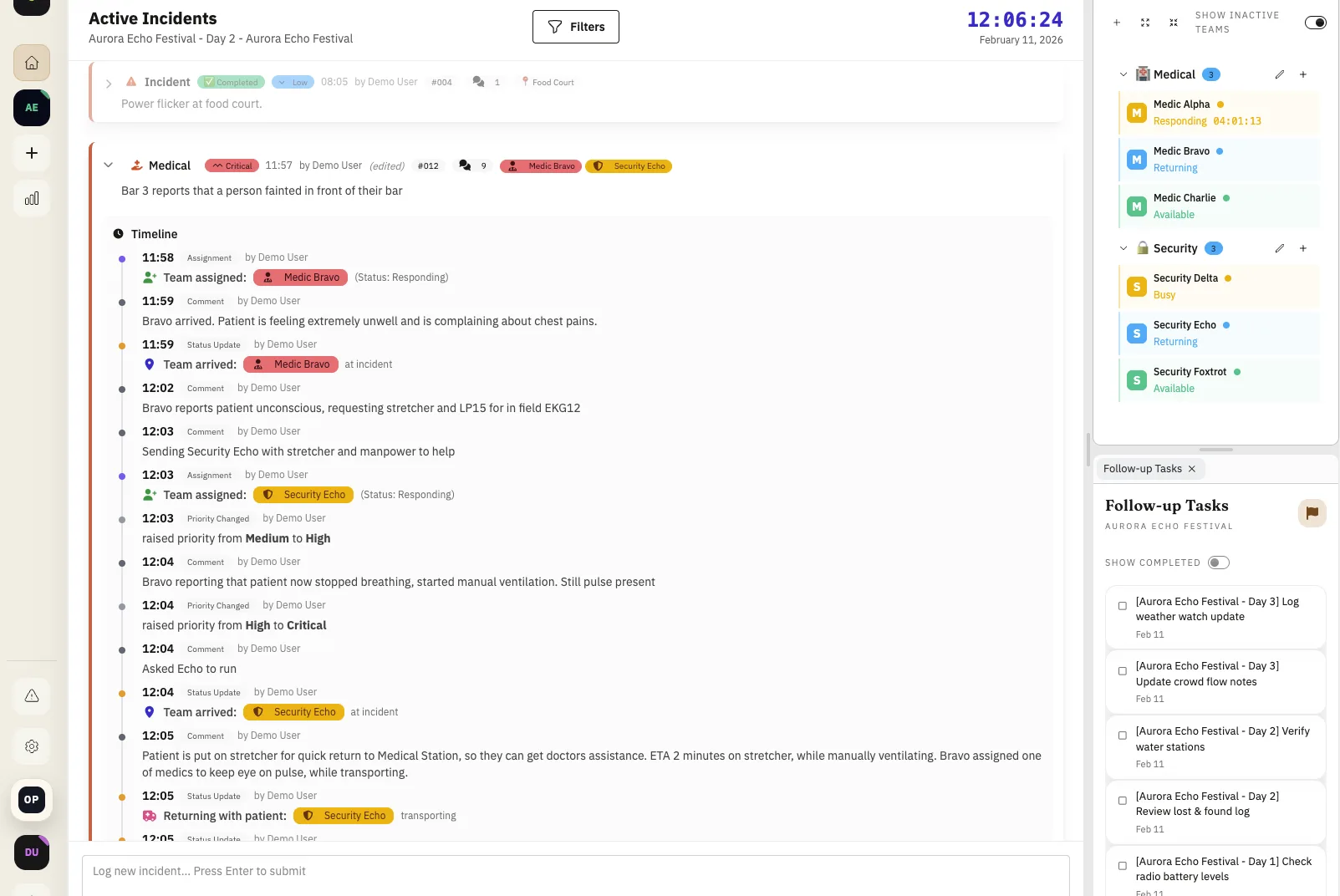
One timeline, not scattered fragments
During live operations, details arrive in bursts. Calls come in over radio, updates get relayed across people, and context can split across channels quickly.
Full Incident History keeps those updates in one chronological incident thread so teams can follow the exact sequence without reconstruction work.
- Chronological event log by default
- Operator attribution on each update
- Status transitions captured in sequence
- Team assignment timers visible directly in timeline context
Capture depth while the incident evolves
A useful incident record is more than status changes. Teams often need image evidence and short operational notes in the same place.
This page format supports all of that directly in timeline context, so updates remain understandable hours later during debrief.
Operators can compact incidents and switch quickly between active cases, while incident isolation keeps each timeline clean and prevents cross-incident noise.
- Image and file references linked to the same record
- Short notes that preserve decision context
- Compact views for faster multi-incident triage
- Incident isolation so updates stay scoped to the right case
Turn history into better next-shift decisions
Debriefs become concrete when teams can replay pressure points with exact timestamps, ownership, and response steps.
Patterns in delay, handoff quality, and escalation triggers can then be translated into practical staffing and protocol changes.
- Detect recurring bottlenecks
- Compare response loops across shifts
- Feed lessons into SOP updates
Example: coordinated medical/security response
A security alert escalates into a medical incident. The timeline captures dispatch, treatment, perimeter control, and final resolution with actor-level accountability.
- Cleaner cross-team debrief
- Defensible documentation trail
- Faster root-cause analysis
- Clear visibility into how long each team worked the incident
FAQ
Does incident history include status and handoff updates?
Yes. Status transitions and handoff moments are captured in sequence so teams can follow how the response evolved.
Can image evidence be attached to the timeline?
Yes. Image attachments can be kept in the incident history so relevant evidence stays tied to the exact point in the response flow.
Who can see incident history?
Incident history is available to authenticated members inside the workspace according to their organization access.
Can we see how long a team has been assigned?
Yes. Team assignment timers are visible in the incident timeline so command can quickly see assignment duration during response and debrief.
Can operators handle multiple incidents at the same time?
Yes. Incidents can be compacted for faster scanning, and incident isolation keeps each update scoped to the correct case so parallel coordination stays clean.
Why does full history matter after the event?
It gives teams a reliable record for debriefs, incident review, and process improvements without piecing details together from separate tools.
Release History
This feature is documented in the following public release notes.
Related Product Pages
Continue your evaluation with pricing, security, and release transparency pages.